


The digital landscape has shifted. A decade ago, keeping data on-premise in a locked server room was considered the gold standard of security. Today, that same infrastructure is likely a liability—creating bottlenecks in performance, prohibiting scalability, and often, failing to meet modern security standards.
According to Gartner, by 2025, 75% of enterprise data will be created and processed outside traditional data centers. The migration to the cloud is no longer a question of “if,” but “when.” However, for organizations handling the data of European Union citizens, this transition comes with a massive caveat: The General Data Protection Regulation (GDPR).
Migrating legacy systems—often brittle, undocumented, and deeply entrenched—to a modern cloud environment is complex enough. When you layer strict GDPR requirements on top, the margin for error disappears. A misconfigured S3 bucket or an unencrypted transfer protocol doesn’t just mean downtime; it can mean fines of up to €20 million or 4% of global turnover.
In this comprehensive guide, we will dismantle the complexities of migrating legacy systems to the cloud while maintaining rigorous GDPR compliance. We will explore the benefits, the specific challenges of legacy architecture, and a step-by-step framework to ensure your digital transformation is secure, compliant, and future-proof.
Understanding the Intersection: Cloud Migration and GDPR
Cloud migration involves moving data, applications, and IT processes from on-premise hardware (legacy systems) to a cloud computing environment (AWS, Azure, Google Cloud, etc.).
GDPR (General Data Protection Regulation) is the legal framework that sets guidelines for the collection and processing of personal information from individuals who live in the European Union (EU).
Why is this intersection critical?
Legacy systems often rely on “perimeter security”—the idea that if the firewall is strong, the data inside is safe. The cloud operates on a “Shared Responsibility Model” and often utilizes Zero Trust architectures. When you move data from a closed box (legacy) to an open, distributed environment (cloud), the governance model changes entirely.
GDPR requires that data protection be “by design and by default.” This means you cannot simply “lift and shift” a messy legacy database to the cloud and hope for the best. The migration process itself is a data processing activity that must be documented, secured, and justified.
Why Migrate from Legacy Systems to the Cloud?
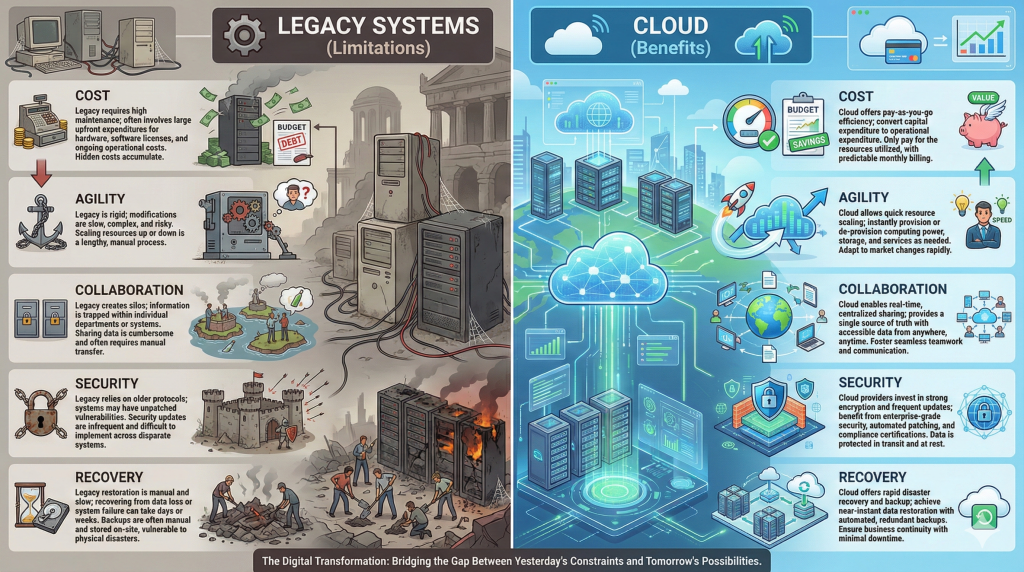
Despite the regulatory hurdles, remaining on legacy infrastructure is often riskier than moving. Old systems stop receiving security patches, hardware degrades, and knowledge is lost as staff retires. Migrating to the cloud offers transformative benefits that align with both business growth and, ironically, better compliance.
1. Enhanced Security Posture
There is a misconception that the cloud is less secure than on-premise. In reality, major Cloud Service Providers (CSPs) invest billions in security—far more than any single enterprise could afford.
- GDPR Relevance: Cloud providers offer built-in tools for identity management, encryption at rest, and anomaly detection, making it easier to satisfy GDPR Article 32 (Security of Processing).
2. Cost Efficiency (CapEx to OpEx)
Legacy systems require heavy upfront capital expenditure (CapEx) for hardware, cooling, and physical security. Cloud migration shifts this to operational expenditure (OpEx).
- Pay-as-you-go: You only pay for the compute and storage you use.
- Maintenance: The burden of hardware failure falls on the provider, not your IT team.
3. Agility, Innovation, and Scalability
Legacy systems are rigid. Adding storage or compute power can take weeks of procurement. In the cloud, it takes seconds.
- Market Response: Companies can spin up new environments to test products quickly.
- Advanced Tech: Access to AI, Machine Learning, and Big Data analytics allows companies to derive insights that were impossible with siloed legacy data.
4. Disaster Recovery and Business Continuity
GDPR Article 32(1)(c) requires the “ability to restore the availability and access to personal data in a timely manner in the event of a physical or technical incident.”
- Legacy Reality: Tape backups and off-site storage are slow and prone to failure.
- Cloud Reality: Automated snapshots, geo-redundancy, and instant failover capabilities ensure high availability and rapid data restoration.
5. Improved Collaboration
Cloud systems break down data silos. Instead of data being trapped on a hard drive in one office, centralized cloud access allows teams across the globe to collaborate in real-time, boosting productivity and reducing version-control errors.
Challenges in Migrating Legacy Systems to the Cloud
The path to the cloud is rarely a straight line. When dealing with systems that may have been built 10 or 20 years ago, specific hurdles arise that threaten GDPR compliance.
1. The “Black Box” Problem (Data Mapping)
Legacy systems often suffer from poor documentation. You may know where the database is, but do you know exactly what data is inside?
- The Risk: If you migrate a legacy database containing “Dark Data” (unclassified data), you might inadvertently move sensitive PII (Personally Identifiable Information) to a non-compliant region or a lower-security storage tier.
- GDPR Implication: You cannot protect what you cannot identify.
2. Compatibility and Integration
Modern cloud platforms rely on APIs, microservices, and containers. Legacy systems often rely on monolithic architecture and hard-coded dependencies.
- The Risk: “Spaghetti code” might break when moved, or require “opening up” secure ports to function, creating vulnerabilities.
- Solution: This often necessitates “refactoring” (rewriting code) rather than just “rehosting” (lifting and shifting).
3. Downtime and Availability
Migration takes time. During the transfer, data must remain available to users (Business Continuity) but also strictly consistent (Data Integrity).
- The Risk: Data corruption during transfer or extended downtime can violate Service Level Agreements (SLAs) and GDPR requirements regarding data availability.
4. Data Sovereignty and Cross-Border Transfers
For US-based companies, this is the most critical compliance hurdle.
- The Issue: GDPR restricts transferring EU citizen data to countries with “inadequate” data protection laws.
- The Challenge: Ensuring your US-based cloud provider stores EU data only in EU availability zones (e.g., AWS Frankfurt, not AWS Virginia) is mandatory unless specific legal frameworks (like Standard Contractual Clauses) are in place.
8 Steps to Migrate Legacy Systems with GDPR Compliance
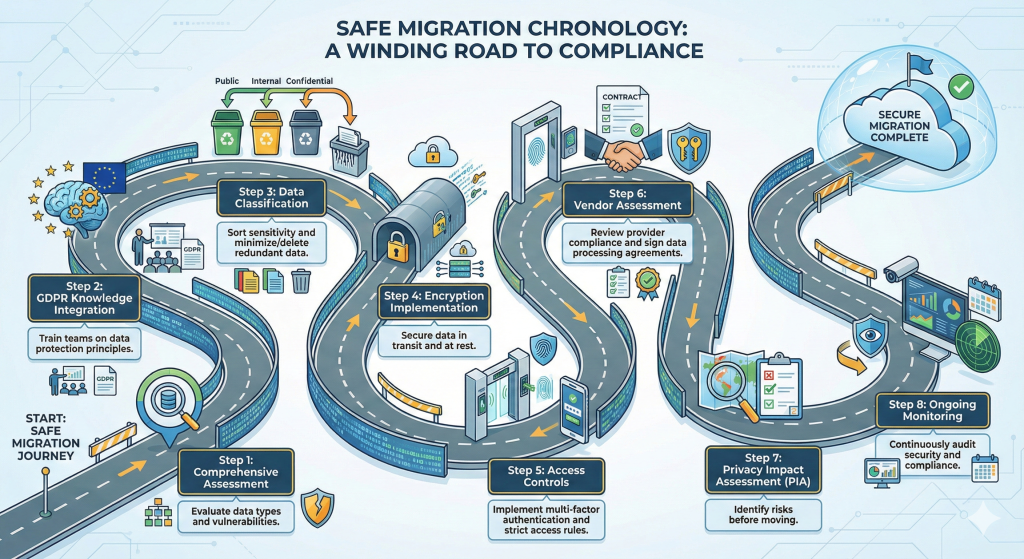
To navigate these challenges, organizations need a structured, compliance-first framework. Here is the roadmap for a secure migration.
1. Comprehensive Assessment and Discovery
Before moving a single byte, you must audit your current estate. Use automated discovery tools to scan legacy networks.
- Identify Assets: What servers, applications, and databases exist?
- Map Dependencies: Which app talks to which database?
- Vulnerability Scan: Are you migrating malware or vulnerabilities? Clean house before you move.
2. Data Classification and Minimization
GDPR Article 5(1)(c) mandates “Data Minimization”—holding only the data strictly necessary for your purpose.
- Classify: Tag data as Public, Internal, Confidential, or Restricted (PII/Sensitive).
- Purge: Legacy systems are hoarders. Delete obsolete data (ROT: Redundant, Obsolete, Trivial).
- Benefit: Migrating less data is faster, cheaper, and reduces your liability surface area.
3. The Privacy Impact Assessment (PIA) / DPIA
A Data Protection Impact Assessment (DPIA) is often mandatory under GDPR when introducing new technologies.
- The Goal: Analyze the migration project to identify privacy risks.
- The Process: Document the flow of data, the risks involved (e.g., interception during transfer), and the mitigation strategies (e.g., encryption). This document serves as your “proof of due diligence” to regulators.
4. Vendor Assessment and Data Processing Agreements (DPA)
Not all cloud providers are created equal. You are the “Data Controller,” and the cloud provider is the “Data Processor.”
- Vet the Vendor: Check their certifications (ISO 27001, SOC 2).
- The DPA: You must sign a Data Processing Agreement. This legally binds the cloud provider to process data only on your instructions and to maintain security standards.
- Location Locking: Ensure the contract specifies exactly where the data will physically reside.
5. Encryption Implementation (In-Transit and At-Rest)
Encryption is your last line of defense. If a breach occurs, encrypted data is useless to hackers.
- In-Transit: Use TLS 1.2 or 1.3 for all data moving between the legacy data center and the cloud. Direct Connect or VPNs should be used for the pipeline.
- At-Rest: Ensure data stored in the cloud (databases, object storage, block storage) is encrypted using strong standards (like AES-256).
- Key Management: Consider “Bring Your Own Key” (BYOK) setups where you hold the encryption keys, not the cloud provider, adding a layer of sovereignty.
6. Access Controls and Authentication (IAM)
Legacy systems often have weak password policies. The cloud demands robustness.
- MFA (Multi-Factor Authentication): Mandatory for all administrative access.
- Least Privilege: Users should only have access to the specific resources they need.
- RBAC (Role-Based Access Control): Assign permissions based on roles (e.g., “HR Manager”) rather than individuals.
7. GDPR Knowledge Integration and Training
Technology fails without people. Your IT team and end-users must understand the new environment.
- Training: Educate staff on phishing, secure cloud access habits, and the importance of not bypassing security controls.
- Culture: Instill a “Privacy by Design” mindset where security is considered at the start of every new feature deployment.
8. Ongoing Monitoring and Auditing
Migration is not the finish line; it is the starting line.
- Logging: Enable CloudTrail (AWS) or equivalent logging to track who accessed what data and when.
- Continuous Compliance: Use tools like AWS Config or Azure Policy to automatically detect and remediate non-compliant resources (e.g., automatically shutting down an unencrypted storage bucket).
Use Cases: Successful Migrations
Leading global companies have navigated this transition, proving that compliance and scale can coexist.
1. Netflix
Netflix migrated from a traditional data center to AWS to handle massive scalability needs.
- The Strategy: They didn’t just “lift and shift.” They refactored their application into microservices.
- GDPR Angle: By isolating services, they can apply granular security controls and easier data deletion protocols (The “Right to be Forgotten”) compared to a monolithic database.
2. Spotify
Spotify moved its infrastructure to the Google Cloud Platform (GCP).
- The Benefit: This allowed them to focus on development rather than server maintenance.
- GDPR Angle: GCP’s robust global network allowed Spotify to store user data in appropriate jurisdictions while utilizing Google’s advanced encryption-by-default features.
3. X (formerly Twitter)
X utilizes a hybrid approach, leveraging Google Cloud and AWS for specific workloads.
- The Strategy: Improving agility and real-time data processing.
- GDPR Angle: They implemented strong privacy safeguards and rigorous access controls within their cloud architecture to manage the vast amount of PII they process daily.
Final Words: Securing Your Future
Migrating legacy systems to the cloud is essential for survival in the modern digital economy. It brings cost efficiency, agility, and the ability to innovate. However, for organizations serving EU markets, GDPR compliance is the guardrail that keeps this innovation on track.
The risks of non-compliance—financial, reputational, and operational—are too high to ignore. By following a structured approach involving assessment, data minimization, strong encryption, and rigorous vendor management, you can turn regulatory compliance from a burden into a competitive advantage.
Partner with XCEEDBD
Migration is complex, but you don’t have to do it alone. XCEEDBD is a premier IT consulting and solutions provider specializing in compliant digital transformation.
Whether you need a cloud managed IT service to handle your infrastructure or custom cloud application development to refactor your legacy apps, our team ensures your transition is seamless, secure, and strictly GDPR aligned.
Ready to modernize your infrastructure without the risk?
Contact XCEEDBD Today for a Free Migration Assessment
Frequently Asked Questions (FAQ)
1. Does moving data to the cloud automatically make me GDPR compliant?
No. Cloud providers offer compliant infrastructure (security of the cloud), but you are responsible for the compliant use of that infrastructure (security in the cloud). This includes how you configure access, encryption, and data handling.
2. Can US companies store EU data in the cloud?
Yes, but with strict conditions. Following the “Schrems II” ruling, you must ensure adequate data protection. This often involves hosting the data in EU-based server regions and signing Standard Contractual Clauses (SCCs) with your provider.
3. What is the biggest risk in migrating legacy apps?
“Shadow IT” and undocumented data. Moving data you don’t fully understand often leads to privacy violations. A thorough discovery and classification phase is critical.
4. What is the “Right to be Forgotten” in the cloud?
Under GDPR, users can ask for their data to be deleted. In a legacy system, this might be a manual SQL command. In the cloud, you must ensure the data is deleted from the database and all backups/snapshots across all regions.
5. How long does a compliant migration take?
It varies by complexity. A simple “lift and shift” might take weeks, while a full “refactoring” of legacy applications to cloud-native microservices can take months or years. Compliance checks should happen at every sprint.
6. Do I need to encrypt legacy data before migration?
Yes. Data should be encrypted “in transit” (while moving) and “at rest” (once it arrives). If your legacy database doesn’t support encryption, you may need to use intermediary tools or VPN tunnels during the transfer.
7. Who is responsible if there is a data breach in the cloud?
Generally, the data owner (you) is liable to the customers and regulators. However, if the breach was caused by a fault in the cloud provider’s physical infrastructure, they may bear liability. This is defined in your Data Processing Agreement (DPA).