Startups move fast—until a messy build slows everything down. The right software can automate operations, unlock new revenue, and give you a real edge. The wrong approach can burn budget, drag timelines, and leave you with a product nobody wants.
This guide walks through software development for startups in a way that’s practical, not theoretical. You’ll see how to shape and validate an idea, pick a technology stack, ship an MVP, protect quality with testing, and plan for scaling after launch.
It’s written for founders, product owners, and early technical leaders who need a clear roadmap (and who don’t have time for vague advice).
What you’ll get in this guide:
- The business reasons startups invest in custom software
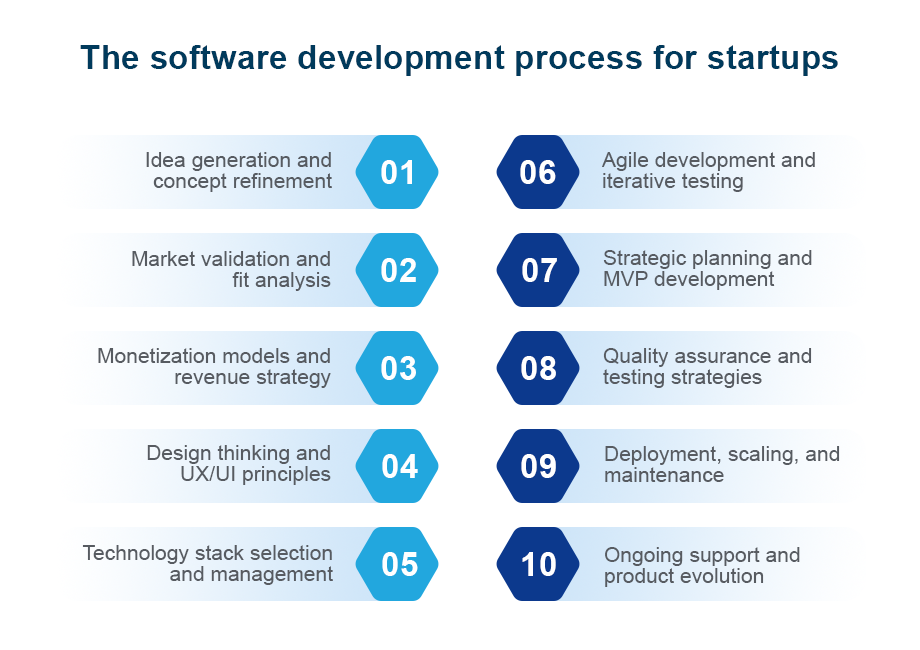
- A startup-friendly software development process (10 stages)
- Common problems that derail projects—and how to prevent them
- Tips to move faster without sacrificing quality
- A straightforward way to think about cost drivers
- Market and technology context (as cited in the original guide)
Related reading: software development models (compare approaches before you commit to one)
Why startups need software development
Software is rarely “just a feature.” For startups, it’s often the engine behind growth and day-to-day execution. Done well, it supports three outcomes:
- Efficiency: Automate repetitive work (inventory updates, sales tracking, internal communication, reporting) so your team can focus on customers and execution.
- Scalability: Build systems that can handle more users, more transactions, and more data as demand grows.
- Competitive advantage: Deliver a smoother experience or unique functionality that generic tools can’t match.
Real-world startup examples:
- eCommerce: Order handling, inventory, and secure payments need to stay reliable even when demand spikes.
- Food delivery: You’ll need ordering, dispatching, driver communication, and delivery tracking working together in real time.
- Marketing agency operations: Lead tracking, campaign management, and reporting often require a workflow that matches how your team actually works.
How to start your software development process (before you write code)
The fastest way to waste money is to jump into development without defining what “success” looks like. Before you hire a team or choose a tech stack, do a short discovery pass.
A simple kickoff checklist for startups
Use this list to create alignment in a day or two:
- Define the outcome. What does the business need the software to accomplish—efficiency, revenue, retention, or a mix?
- Name the target user. Who is this for, and what pain point are you solving?
- Write a “must-have” scope. Identify the smallest feature set that proves value.
- Validate demand. Use market research, competitor reviews, and early customer conversations to confirm the problem is real.
- Choose a monetization direction. Subscriptions, freemium, ads, sponsorships, in-app purchases—pick one primary approach early.
- Set constraints. Budget, timeline, security needs, platforms (web/mobile), and any required integrations.
- Decide how you’ll build. In-house, outsourced, or a dedicated development team.
Deliverable you can keep simple: a one-page “product brief” with your target user, core problem, MVP scope, and success criteria.
Questions that prevent expensive rework
If you only answer a few things before development begins, make it these:
- What is the single primary action the user should be able to complete?
- What data must you store, and who should be able to access it?
- What are your non-negotiables: security, reliability, performance, compliance, or speed to market?
- What does a successful MVP look like in plain terms (examples: “100 paying users,” “cuts admin time in half,” “processes orders reliably”)?
- What will you intentionally not build in version 1?
Types of software development startups commonly use
Software development covers many build types. Your choice depends on your product and how users interact with it.
- Web development: Websites and browser-based web apps
- Mobile app development: iOS/Android apps for phones and tablets
- Desktop applications: Software installed on computers
- Game development: Gaming products
- Embedded software development: Software inside devices (medical equipment, vehicles, appliances)
- Cloud computing: Cloud-based services and platforms
- Data science & machine learning: Software that analyzes data and produces predictions
If you need consistent execution but don’t have the full team in-house, hiring a dedicated development team can give you focused expertise without constant staffing churn.
The software development process for startups (10 stages)
A strong process gives you speed with control. The stages below map the full software development life cycle in a startup-friendly way.
1) Idea generation and concept refinement
This is where direction is set. Your goal is to turn a rough idea into a clear, buildable concept.
What to do:
- Run brainstorming sessions (capture everything, then narrow).
- Check market and feasibility: Is there demand? Is it viable and scalable?
- Select the best concept and refine it into an actionable plan.
Output you want: a clear concept statement your whole team agrees on.
Mini template (copy/paste):
- Problem we solve:
- Who has it:
- What they do today (workaround):
- Our solution in one line:
- MVP must include:
- MVP must not include (yet):
2) Market validation and fit analysis
Startups win by building what users actually want—not what the internal team assumes they want.
Good practices in this stage:
- Market research: Surveys, interviews, and analysis to understand customer needs and pain points.
- Competitor analysis: Identify gaps and opportunities for differentiation.
- Customer feedback: Early conversations, pilot tests, and feedback loops to refine the concept.
Output you want: evidence that the problem is real and a short list of user needs ranked by importance.
3) Monetization models and revenue strategy
Monetization isn’t a “later” decision. It impacts UX, feature priorities, and even your infrastructure needs.
Monetization options covered in the original guide:
- In-app purchases (common for games and utility apps)
- Paid subscriptions (recurring revenue tied to ongoing value)
- Sponsorships (brand partnerships aligned to your audience)
- Freemium (free basics; paid advanced features or add-ons)
- Advertising (often depends on a large user base)
Output you want: one primary monetization model and the MVP behavior it relies on (example: “users subscribe after X value is delivered”).
4) Design thinking and UX/UI principles
A product can be technically “finished” and still fail if it’s confusing to use. UX/UI is where you earn trust.
Focus on:
- User-centered design: Design around user needs and behavior.
- Consistency and simplicity: Make it easy to navigate and predict.
- Responsive design: Ensure it works smoothly across devices.
- Accessibility features: Build with inclusivity in mind.
Output you want: user flows + wireframes for the most important screens.
Fast UX/UI deliverables that keep teams aligned:
- A simple user flow for the core action (from entry to completion)
- Wireframes for key screens
- A short UI style guide (buttons, typography, spacing rules)
5) Technology stack selection and management
Your stack shapes your build speed today and your maintenance burden later.
The original guide highlights these decision factors:
- Scalability and flexibility: Cloud services such as AWS or Azure can support growth.
- Security and reliability: Choose technologies known for stability and security features.
- Cost-effectiveness: Open-source options (including databases) can reduce cost.
- Cross-platform development: Consider tools that support multiple platforms if reach matters.
Output you want: a documented tech stack decision (and why you chose it).
A practical “stack map” to document:
- Front end (what users see)
- Back end (business logic and APIs)
- Database (where data lives)
- Hosting/cloud setup
- Source control (how code changes are tracked)
- Testing and deployment approach
Using the “popular tools” list as guardrails (not rules):
The original guide calls out widely used options like JavaScript, Python, Java, C#, and PHP, plus web frameworks such as jQuery, React.js, and Angular. It also notes MySQL as a widely used database (as of 2020) and highlights GitHub as a key development tool. If you’re early-stage, these “common choices” can be a helpful sanity check—especially when you want a stack that’s easy to support long term.
That said, don’t pick technologies just because they’re popular. Pick what your team can build, test, deploy, and maintain confidently.
If you want a second set of eyes, software consulting can help you make informed technology decisions before you commit.
6) Agile development and iterative testing
Startups rarely follow a straight line. Agile methods—especially Scrum—are built for change.
Core practices:
- Sprint planning: Short development cycles that ship meaningful progress.
- CI/CD: Automate builds, testing, and deployment to reduce errors and move faster.
- User testing and feedback loops: Put versions in front of real users, then iterate.
Output you want: a working increment at the end of each sprint (not just “progress updates”).
Example sprint structure (simple and effective):
- Day 1: Sprint planning and scope lock
- Week 1: Build + daily check-ins
- Week 2: Finish features, test, fix, and demo
- End of sprint: Review + retrospective + backlog update
Related reading: benefits of Agile software development
7) Strategic planning and MVP development
An MVP is a strategic release—not a rushed one. The point is to prove value and learn from real usage.
Include:
- Goal setting and a roadmap: Key milestones and timelines.
- Lean development practices: Build only the core functionality your target users need.
- Feedback and iteration: Launch, gather feedback, improve.
Output you want: an MVP roadmap with clear “must-have” features and a timeline you can communicate.
MVP prioritization method (no jargon required):
- Must-have: Required to solve the core problem
- Should-have: Important, but can wait until after launch
- Could-have: Nice additions once the basics work
- Won’t-have (for now): Park it intentionally so it doesn’t steal time
Example MVP scoping (eCommerce):
- Must-have: product catalog, cart, checkout, order confirmation, inventory updates, secure payments
- Later: recommendations, loyalty program, advanced reporting, internationalization
8) Quality assurance and testing strategies
Quality is not optional for startups. Early users are less forgiving, and a single bad experience can hurt traction.
The original guide recommends:
- Test plan development: Cover functionality, usability, security, and performance.
- Automated testing: Speed up testing and improve coverage.
- User acceptance testing (UAT): Real users test before release.
Output you want: a repeatable testing routine (not a last-minute scramble).
A lightweight test plan outline you can use:
- Critical user flows (the “money paths”)
- Performance expectations (what “fast enough” means)
- Security checks (authentication, authorization, data handling)
- Regression testing list (what must be re-tested each release)
What to test first (startup-friendly):
- Core workflows: the few actions that must work every time (sign-up/login, checkout, order placement, etc.)
- Edge cases: what happens when a payment fails, data is missing, or a user retries an action?
- Device and browser coverage: confirm the experience is consistent on the devices your users actually use
- Permissions and access: make sure users only see what they’re supposed to see
- Performance sanity checks: identify the slow screens and heavy queries early, before you add more features
Mini UAT script (you can hand to test users):
- Start from a clean slate (new user or fresh session).
- Complete the main goal once.
- Try to break it (wrong password, invalid input, repeat the action).
- Note anything confusing, slow, or inconsistent.
- Answer one question: “Would you use this again next week—why or why not?”
9) Deployment, scaling, and maintenance
Launch day is only the beginning. Startups need a reliable path from development to production—and a plan for growth.
Focus on:
- Deployment automation: Reduce manual steps so releases are consistent.
- Scalability planning: Ensure the infrastructure can handle growth (cloud-based scaling is commonly used).
- Ongoing maintenance: Monitor issues, patch vulnerabilities, and fix bugs as they appear.
Output you want: a release checklist your team uses every time.
Basic release checklist:
- Confirm the core user flows work end-to-end
- Run automated tests and review failures
- Verify deployment steps (and rollback steps) are clear
- Confirm monitoring/logging is in place for the key flows
- Plan who handles support during and after launch
10) Ongoing support and product evolution
Once users are active, you’ll discover what needs improvement faster than any internal planning session could predict.
Sustain success with:
- Customer support framework: A clear system for handling questions and issues quickly.
- Continuous feedback loop: Collect user feedback and use it to guide updates.
- Evolution and expansion: Keep the product relevant as markets and technology shift.
Output you want: a support and iteration rhythm (example: weekly feedback review + monthly roadmap refresh).
Support playbook essentials:
- A clear path for users to report issues
- A simple way to prioritize bugs vs. feature requests
- Ownership (who responds, who fixes, who communicates updates)
- A cadence for product updates so improvements keep shipping
A simple delivery rhythm that keeps startups aligned
Process is important, but rhythm is what makes it real. A lightweight cadence helps you ship consistently and avoid “we thought you meant…” surprises.
A practical cadence many startups use:
- Weekly demo: show working software (even if it’s small). Stakeholders react to what they see, not what they imagine.
- Backlog review: keep a single prioritized list of work so the team always knows what matters most.
- Sprint planning: commit to a realistic set of work for the next short cycle.
- Mid-sprint check-in: confirm blockers early (instead of discovering them at the end).
- Retrospective: decide one improvement for the next cycle (testing coverage, clearer requirements, faster reviews, etc.)
Artifacts that keep everyone on the same page:
- Product brief (problem, user, MVP scope, success criteria)
- Wireframes/user flows for new features
- A living roadmap (what’s now/next/later)
- A release checklist (QA + deployment steps)
- A feedback log (what users are asking for, in their own words)
This is especially helpful when you’re working with an outsourced or dedicated team, where clear communication is part of product quality.
Problems startups face in the development process (and how to fix them)
Even well-run teams hit predictable issues. The goal is to design your process so problems don’t become project killers.
| Case | Common problem | Practical fix |
| Case 1 | Teams focus on the finished product and overlook the most important requirements | Planning: identify critical needs early and validate them during initial analysis |
| Case 2 | Late, sudden scope changes disrupt the workflow and delay delivery | Choose the right model: Agile/Scrum lets you revisit stages and adapt without breaking everything |
| Case 3 | Development and maintenance issues (bugs, server failures, coding challenges) show up mid-project | Source control: maintain a central repository so you can recover quickly and track changes |
Tips for fast software development (without sacrificing quality)
In startup environments, speed is a competitive advantage—until speed creates technical debt and rework. These steps help you move quickly while protecting quality.
- Build the MVP first. Start with the features that solve the biggest customer pain point.
- Prioritize ruthlessly. If it’s not essential to launch, defer it.
- Work in short iterations. Agile sprints keep progress visible and reduce risk.
- Use existing tools and resources. Reuse proven libraries and components instead of rebuilding basics.
- Automate where possible. Automate repetitive tasks like testing and deployment so your team can focus on higher-value work.
The original guide also notes that modern software testing tools can reduce manual workload and speed up delivery without sacrificing quality.
Related reading: modern software testing tools
Build in-house, outsource, or hire a dedicated team?
How you staff the work affects everything—speed, cost, and how much context stays inside your company.
In-house development
Best when you need tight control and want knowledge to live internally. Costs typically include salaries, benefits, office space, and equipment.
Outsourcing
Many startups outsource to control cost and access skills quickly. The original guide highlights Southeast Asia (including Vietnam) as a popular outsourcing region because costs can be lower while quality remains strong.
Dedicated development team
A dedicated team model gives you consistent support and focused expertise over time—often a strong fit when you need ongoing iteration, not a one-off build.
Partner selection checklist (short, but useful):
- Can they explain their development process clearly (including testing and deployment)?
- Do they support Agile delivery and feedback loops?
- Do they use source control and structured QA?
- Can they help with technology stack decisions and scaling planning?
- Do they communicate in a way your team can work with week after week?
Before you choose a partner, ask for clarity on:
- Scope and deliverables: what exactly will be shipped in the MVP—and what’s explicitly out of scope
- Ownership: who manages requirements, design decisions, QA, and deployment
- Feedback loops: how often you’ll see working software and how changes are handled
- Documentation: what you’ll receive (architecture notes, setup steps, release instructions)
- Post-launch support: what happens after go-live (bug fixes, maintenance, evolution)
A good partner doesn’t just write code. They help you make trade-offs, keep scope under control, and build something you can grow.
Breaking down software development costs for startups
Cost varies widely based on what you build and how you build it. The original guide provides this directional range:
- A simple app may cost around $50,000
- A complex app can reach $250,000
What typically pushes cost up:
- Scope and complexity: A basic site is usually simpler than a feature-rich app across multiple platforms.
- Design depth: A custom, highly polished UI/UX takes more time and expertise.
- Integrations: Connecting to other systems adds build time and testing.
- Team model: Developers are often the biggest cost line. In-house teams add overhead (benefits, equipment, space).
- Location: The original guide cites an average of about $8,500 per month for a software developer in the United States.
Quick cost-planning worksheet (5 minutes):
- List the MVP features (10–20 bullet points is fine).
- Mark each as must-have or later.
- Decide what you’re building first: web app, mobile app, desktop app, or a mix.
- Choose the team model: in-house, outsourced, or dedicated team.
- Identify any required integrations (payments, inventory, delivery tracking, reporting, etc.).
- Add QA and post-launch maintenance to the plan from day one.
Even rough answers here will make your budget conversations more realistic—and help you avoid paying for features you don’t need yet.
Simple example (for planning only):
If you staffed 3 developers at $8,500/month for 6 months, staffing alone would be $153,000 (3 × 8,500 × 6). That’s why many startups control scope with an MVP and consider outsourcing or a dedicated team.
Where costs hide (and how to keep them visible):
- Unclear requirements that lead to rework (fix with a product brief and MVP scope)
- Late changes that reset timelines (fix with Agile stages and frequent demos)
- Manual testing and deployments that slow releases (fix with automation and CI/CD)
- No maintenance plan, so every bug becomes a fire drill (fix with ongoing support)
Software development market overview and technologies used
Understanding the broader market is helpful for founders planning budgets, hiring, or a development partnership.
Market overview (figures cited in the original guide)
- The custom software development market size was cited as USD 28.2 billion in 2022, with an estimated CAGR of over 21.5% from 2023 to 2032.
- In 2023, North America held the largest global revenue share in custom software development (32.55%, as cited).
- Europe’s market was projected in the original guide to grow by about 23% per year from 2024 to 2030, with an example noted in December 2023 involving Nokia’s 5G software being selected by Telia in Finland as part of an EU-funded program.
- The original guide cited 26.4 million software developers worldwide in 2019, projecting 27.7 million in 2023 and 28.7 million in 2024.
These figures shift over time; use them as context rather than a fixed forecast.
Technologies used in software development (as cited)
The original guide highlights the breadth of options and a few widely used tools:
- 700+ programming languages exist across the industry.
- Windows was cited as the most common developer environment (61%), followed by Linux (47%), then macOS.
- Popular languages listed: JavaScript, Python, Java, C#, PHP
- MySQL was noted as the most widely used database system (as of 2020).
- Popular web frameworks cited: jQuery, React.js, Angular
- GitHub was highlighted as an essential software development tool.
- Python was described as one of the fastest-growing languages.
Related reading: Machine Learning in software development (for teams exploring data-driven features)
Practical takeaway for founders: don’t try to “optimize” the stack on day one. Start with technologies your team (or partner) can support reliably, keep the system simple, and revisit choices as you learn from real users and real traffic.
Common mistakes to avoid
If you want the short version of what derails startup software projects, it’s usually one of these:
- Building too much before validating market demand
- Treating the MVP as a “throwaway” instead of a strategic release
- Choosing a tech stack before the product requirements are clear
- Letting last-minute changes explode the scope
- Skipping automated testing and UAT to “save time”
- Launching without a plan for scaling and maintenance
- Not using source control (or using it inconsistently)
Final takeaway: a startup-ready checklist
Before you start building—and throughout development—use this checklist to stay focused:
- Clarify what you need and why (efficiency, scalability, competitive advantage)
- Validate the idea with real market feedback
- Decide on a monetization model early
- Design for simple, consistent UX across devices (with accessibility in mind)
- Choose a stack that supports security, reliability, and growth
- Deliver in Agile sprints with feedback loops
- Protect quality with test plans, automation, and UAT
- Automate deployment and plan for scaling and maintenance
- Support users, collect feedback, and evolve the product
Want help turning this into a real plan and build? Talk to XCEEDBD, a custom software development company, and explore related resources on software development models, Agile software development benefits, hiring software developers, modern software testing tools, and machine learning in software development.
Ready to build?
Contact XCEEDBD to discuss your startup software requirements, MVP scope, timeline, and a practical development plan.
FAQ
1) What is software development for startups?
It’s the process of planning, building, testing, launching, and maintaining software that helps a startup run efficiently, scale, and compete—often starting with an MVP.
2) What are the stages of the startup software development life cycle?
A typical path includes idea refinement, market validation, monetization planning, UX/UI design, tech stack selection, Agile development, MVP delivery, QA/testing, deployment/scaling, and ongoing support.
3) What is an MVP in startup software development?
An MVP (minimum viable product) is the smallest version of your product that delivers core value, attracts early users, and generates feedback for iteration.
4) How can startups speed up software development without losing quality?
Focus on MVP scope, prioritize features ruthlessly, use Agile sprints, reuse existing tools/libraries, and automate testing and deployments.
5) How much does software development cost for a startup?
The guide’s directional examples place simple builds around $50,000 and complex builds up to $250,000—depending on scope, design, integrations, and team model.
6) Should a startup build in-house or outsource software development?
In-house offers control but adds overhead. Outsourcing or a dedicated team can reduce cost and speed execution—especially when you need consistent delivery and iteration.
7) What should a startup test before launching software?
At minimum: core workflows, usability, security, performance, and user acceptance testing (UAT) with real target users before release.