The landscape of professional training and digital education is shifting rapidly. Nearly half of the world’s most profitable organizations use eLearning techniques to assist novice professionals in honing their technical skills. This shift is not just a trend; it is a fundamental change in how knowledge is distributed and consumed. Employers are witnessing an enormous rise in worker engagement with an eLearning platform. Furthermore, on average, employees use eLearning platforms for learning for over 5 hours.
To capitalize on this growing demand and ensure high engagement, creating a well-structured and highly functional digital environment is non-negotiable. In this comprehensive guide, we have put together some best practices for building an eLearning portal, as eLearning improves learning possibilities and provides a medium. Read on to create a successful and profitable eLearning portal.
What is an eLearning Portal?
An eLearning portal is a digital platform that facilitates online learning and education. Think of it as a comprehensive, centralized digital campus. It is a central location where users, students, professionals, or learners in other fields can access courses, resources, and instructional information.
These platforms are designed to remove geographic and temporal barriers to education. eLearning portals, generally furnished with features such as interactive elements, evaluations, and multimedia classes, offer a convenient and adaptable means for people to broaden their knowledge, learn new skills, and participate in educational activities from a distance. To manage the backend functionality of these portals, learning management systems (LMS) are frequently integrated into these platforms to track user progress, organize and deliver information, and enable instructor-student interactions.
Key Features of an eLearning Portal
An eLearning portal’s ability to succeed in the ever-changing world of online education frequently depends on how many features it offers. Building a platform that simply hosts text is no longer sufficient. The following are some essential features that enhance an eLearning platform’s efficacy and user satisfaction:
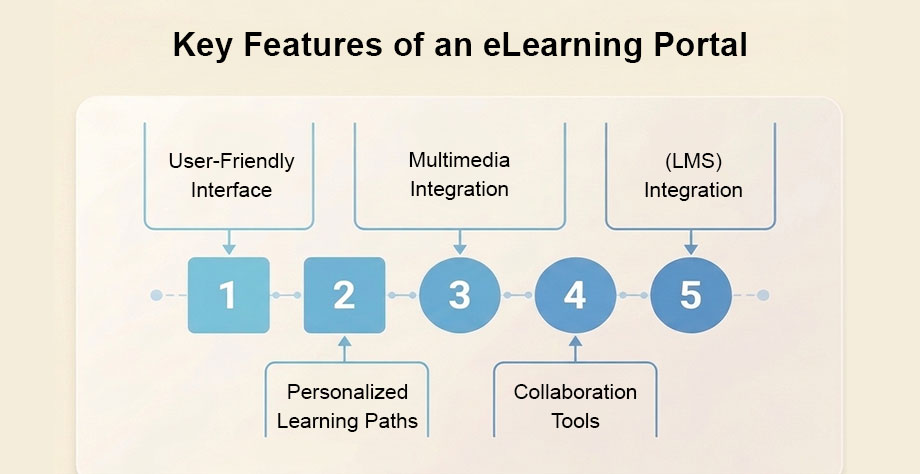
1. User-Friendly Interface
The success of an eLearning site depends on its capacity to offer a smooth and simple user experience. If a user cannot figure out how to navigate to their next lesson within seconds, engagement drops. With an intuitive interface, learners can effortlessly browse the platform, irrespective of their technical proficiency.
- Core Elements: It includes accessible elements, an uncluttered layout, and obvious and logical navigation pathways.
- Impact on Experience: Efficient user onboarding, simple progress tracking, and easy course discovery enhance a happy learning environment. A well-designed interface increases learners’ engagement, lessens their annoyance, and directs their attention away from the platform’s usability and into the instructional material.
2. Multimedia Integration
Text-heavy pages lead to cognitive overload. Multimedia integration is a pivotal feature that enriches the learning experience by diversifying content formats.
- Content Variety: Multimedia components like music, visuals, movies, and interactive simulations are included to accommodate different learning styles.
- Comprehension Benefits: It helps with improved comprehension and memory of the material and makes the subject more entertaining. Multimedia integration makes instructional content alive through visually appealing graphics, interactive quizzes, or video lectures. It guarantees that students have access to dynamic, immersive resources, promoting a more thorough and successful educational experience on the eLearning portal.
3. Learning Management System (LMS) Integration
The backend architecture is just as critical as the frontend design. The smooth integration of a learning management system (LMS) is a crucial component of an eLearning portal.
- Administrative Control: By streamlining the administration and delivery of instructional materials, this integration enables administrators to plan courses, monitor student progress, and evaluate performance.
- Operational Efficiency: The LMS makes creating organized lesson plans easier, storing content centrally, and effectively communicating with students and teachers. This integration improves the administrative features of the eLearning platform, and users will benefit from a better-structured and efficient learning environment.
4. Personalized Learning Paths
Modern learners expect tailored experiences. One essential component that meets each user’s unique demands and preferences is personalized learning pathways.
- Customized Recommendations: An eLearning portal with individualized learning paths guarantees a more exciting and successful learning experience by providing customized material recommendations based on users’ interests, abilities, and progress.
- Autonomy and Motivation: Students can follow a curriculum that suits their objectives, learning styles, and past knowledge, promoting motivation and autonomy. This feature helps improve educational outcomes and raise learner satisfaction because users can walk through a personalized journey linked with their objectives.
5. Collaboration Tools
Learning should not happen in a vacuum. In an eLearning environment, collaboration tools encourage interaction and engagement.
- Community Building: These tools foster a collaborative learning environment by facilitating communication between students, teachers, and classmates.
- Interactive Features: Users can exchange ideas, ask for help, and collaborate on projects with the help of features like discussion boards, chat features, and collaborative projects. This collaborative and social element fosters peer support and knowledge exchange, improving learning. By adding collaboration options to an eLearning site, users can feel more connected to one another and the community, enhancing the learning experience.
Best Practices for Developing an eLearning Portal
Creating a successful eLearning portal requires strategic planning and careful consideration of various factors. Rushing into development without a solid blueprint often leads to poor user retention. These best practices guide the development process to ensure an optimal learning experience for users.
Conduct a Thorough Needs Analysis
One of the most important steps in creating a successful eLearning portal is performing a comprehensive needs analysis. You must identify exactly what problem your platform is solving. It entails being aware of the intended audience, their learning goals, and the particular needs for the instructional materials. Developers can customize the features, content structure, and operations of a portal to provide a personalized and engaging learning experience by analyzing users’ specific needs and preferences.
Prioritize User-Friendly Design
A user-friendly design is essential for creating an eLearning portal promoting positive user experiences. A well-designed interface improves learners’ accessibility and usability, has a clear information arrangement, and allows simple navigation. A consistent and flexible experience across various devices is ensured by putting responsive design ideas into practice . eLearning portals can optimize usability and enhance the overall performance of the educational platform by placing a high priority on user-centric design.
Implement Strategic Content Organization
One of the finest practices for creating an eLearning site is to organize the information efficiently. Disorganized content frustrates users quickly. It includes managing instructional content in a way that makes sense and is easy for students to navigate through courses, modules, and resources. Effective learning management is facilitated by well-categorized content, which makes it easier for users to find and interact with pertinent information. The success of the eLearning platform is increased and the user experience is improved overall by utilizing searchable databases, intuitive classification, and well-defined routes.
Establish a Clear Course Structure
Establishing a clear course structure is paramount for an effective eLearning portal. An established course structure presents the material in a logical and clear manner, outlining the learning process. This clarity helps students understand how topics, goals, and evaluations progress. An organized course design makes learning easier, assisting students in understanding concepts logically and building a sense of achievement as they move through the curriculum. Having well-defined course structures increases student engagement and overall satisfaction with the instructional material.
Commit to Responsive Design and Device Accessibility
One important recommended practice for creating an eLearning portal is to have a responsive design. It guarantees a consistent and user-friendly experience as the platform’s interface effortlessly adjusts to different screen sizes and devices. Responsive design ensures that students can access courses and content easily on various devices, including computers, tablets, and smartphones, which increases accessibility and engagement across platforms.
Furthermore, ensuring accessibility across devices is critical for the success of an eLearning portal. It involves adjusting the platform to run seamlessly across various devices, considering input methods, screen sizes, and resolutions. Developers who prioritize accessibility ensure that students may interact with the material on any platform, promoting inclusivity and improving the user experience in general. This strategy makes the eLearning portal more adaptable and accommodating by considering users’ varied tastes and learning styles.
Embed Engaging Multimedia Elements
One of the greatest practices for creating an eLearning site is to include interesting multimedia components. As it can accommodate a variety of learning styles, multimedia—such as interactive simulations, movies, and graphics—improves the learning process. Interactive materials and captivating graphics successfully reinforce topics while grabbing learners’ attention. By creating a dynamic and engaging learning environment, this technique helps students retain and comprehend the course material better.
Multimedia components must be included in the eLearning site to provide students with an engaging learning environment. Videos, audio snippets, and interactive graphics are examples of multimedia that enhance instructional information and cater to different learning styles. This method promotes improved understanding and memory of the material and makes studying more pleasurable. Developers can improve the overall efficacy and quality of the eLearning site and create a compelling and engaging learning environment by carefully incorporating multimedia elements.
Tips for Successful eLearning Portal Implementation
Strategic preparation and careful execution are necessary before launching an eLearning portal. A great design means little without a solid rollout strategy. Here are the following tips to guarantee your eLearning portal’s success:
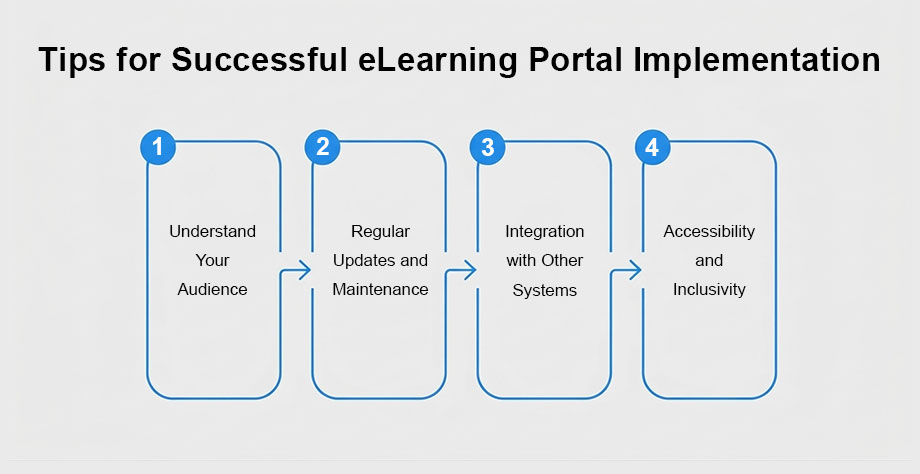
- Understand Your Audience: A thorough grasp of your audience is one of the most important guidelines for implementing an eLearning portal successfully. It’s crucial to conduct in-depth market research and pinpoint your target audience’s precise requirements, preferences, and learning styles before creating and releasing the platform. Consider variables like age groupings, educational attainment, and tech literacy. Adapting the features, design, and content to your audience’s expectations will increase user satisfaction and engagement. Understanding your users’ goals and difficulties will help you design a customized and successful eLearning program that fits their particular needs and eventually advances the platform’s success.
- Regular Updates and Maintenance: Ensuring the long-term success of an eLearning portal involves a commitment to regular updates and maintenance. Frequent updates may involve adding new features, resolving software faults, and updating course materials to reflect developments in the business. Furthermore, conducting maintenance duties is crucial, including updating cybersecurity protocols and streamlining server efficiency. The eLearning portal stays safe, up to date, and in line with the constantly shifting requirements of students and the educational environment by continuously allocating resources for upgrades and maintenance.
- Integration with Other Systems: Smooth interaction with other systems is necessary to install an eLearning portal successfully and provide a connected and unified learning environment. Beyond the eLearning platform, this connection includes connectivity with analytics systems, customer relationship management (CRM) tools, and other third-party services. Consolidated data, faster workflows, and effective data interaction across multiple components are ways a well-integrated eLearning system improves user experience. A strategically integrated eLearning portal optimizes operations and adds to the educational environment’s overall success, whether by integrating analytics tools for thorough performance monitoring or connecting user data to a CRM for personalized interactions.
- Accessibility and Inclusivity: A successful eLearning portal must provide accessibility and inclusivity; a practical implementation considers the demands of various users, including those who are disabled. It entails following accessibility guidelines so that users of multiple abilities can utilize the platform. The platform becomes more inclusive by adding capabilities like keyboard navigation, captions for multimedia content, and alternative text for images. Different learning preferences are also accommodated by offering material delivery in diverse formats. Accessibility is given priority in a genuinely successful eLearning portal, creating a welcoming learning environment where all users can participate productively with the instructional materials.
eLearning Portal Cost and ROI Expectations
Budgeting accurately is a critical step in platform development. The cost of developing an eLearning portal can vary from $8,000 to $250,000, contingent upon website complexity, style, quantity and kind of features, development approach, and web developer location.
The current market may see a greater need for eLearning website development due to the growing demand and quick expansion of eLearning solutions, particularly given that there will be 0.92 billion users of online learning platforms worldwide by 2027. Understanding the different tiers of development is crucial, as the choice between creating an advanced eLearning portal or a basic/MVP website will significantly impact your development expenses.
- MVP / Basic Complexity: To save development costs and ensure a higher return on investment, startups typically begin with an MVP website. The cost of developing an MVP/basic complexity eLearning website is between $8,000 and $15,000.
- Standard Website: For established organizations needing robust core features without heavy custom logic, the cost of developing an eLearning standard website is $25,000 to $70,000.
- Advanced Website: For enterprise-grade platforms requiring extensive custom integrations, the average cost of the advanced website will range from $90,000 to $250,000.
Despite the upfront investment, the financial returns are highly favorable. These solutions have an average annual ROI of 50% to 400%.
Real-World Examples of eLearning Portals
Within the quickly changing field of online education, eLearning portals are essential for offering a wide range of accessible learning possibilities. Analyzing industry leaders helps illustrate these concepts in practice. Here are a few well-known examples that have had a significant influence:
Coursera

Coursera is a well-known eLearning platform that offers a vast array of courses, specializations, and degrees in collaboration with leading universities and organizations across the globe. It gives students excellent learning materials in various subjects, including the humanities and computer science.
- Standout Features: * Coursera offers many courses on various topics, including business, technology, health, and more.
- Learners can pursue recognized universities’ accredited degrees and specializations.
- Coursera offers both self-paced and instructor-led courses, allowing users to learn quickly.
- The platform gives assignments, tests, and peer-reviewed evaluations to support learning.
edX

edX is an open-source eLearning platform founded by Harvard and MIT. It works with colleges, organizations, and business executives to offer various programs and courses. The goal of edX is to provide top-notch instruction to a worldwide student body.
- Standout Features: * edX offers courses in a range of subjects by partnering with prominent universities.
- Students can enroll in MicroMasters programs and receive professional credentials to advance their knowledge.
- edX is also an open-source initiative enabling educational institutions to design unique eLearning programs.
- Through discussion boards, forums, and cooperative learning, the platform promotes a feeling of community.
Skillshare

Skillshare is an online learning platform that offers a diverse range of courses across various creative fields. Skillshare provides a forum for educators and students to work together to develop their skills with topics ranging from writing and business to graphic design and photography.
- Standout Features: * Skillshare strongly emphasizes experiential learning with numerous courses incorporating real-world projects to solidify skills.
- Students can interact with friends and teachers, share work, and participate in conversations.
- Skillshare’s business model is subscription-based, giving consumers unrestricted access to the course catalog with only one membership.
LinkedIn Learning
LinkedIn Learning is an eLearning platform integrated with the professional networking site LinkedIn. It provides an extensive course on technology, business, and creative abilities. LinkedIn Learning is intended to assist professionals in developing and acquiring career-related skills.
- Standout Features: * The system makes course recommendations to users based on their professional interests, abilities, and profile.
- After finishing courses, students can display their accomplishments on their LinkedIn profiles by earning certificates and badges.
- Industry professionals frequently teach courses on LinkedIn Learning, offering excellent instruction with content pertinent to the industry.
Summary and Key Takeaways
eLearning portals significantly enhance the education experience, and adherence to best practices can elevate their effectiveness even more. Keep up with the latest trends and continually improve your platform for the best results . eLearning portals are transforming how we educate, leading to an improved, more inclusive, and accessible learning landscape. Both learners and educators must understand how to effectively navigate and utilize eLearning portals to ensure a holistic and comprehensive learning journey.
Ready to transform your educational vision into a scalable digital reality? XCEEDBD can significantly contribute to the successful implementation of your eLearning portal by offering comprehensive development solutions tailored to your specific needs. With a team of skilled and experienced developers, we specialize in creating robust, scalable, and feature-rich eLearning portals that enhance the learning experience. Whether starting from scratch or looking to enhance an existing eLearning platform, connect with us to be your reliable partner in achieving success in digital education. Contact XCEEDBD today for a custom development consultation.
FAQ
1. What exactly is an eLearning portal? An eLearning portal is a digital platform that facilitates online learning and education. It functions as a central location where users, students, professionals, or learners in other fields can access courses, resources, and instructional information.
2. How much does it cost to build a custom eLearning portal? The cost of developing an eLearning portal can vary from $8,000 to $250,000, contingent upon website complexity, style, quantity and kind of features, development approach, and web developer location. An MVP or basic website ranges from $8,000 to $15,000 , while a standard website costs $25,000 to $70,000 , and an advanced website ranges from $90,000 to $250,000.
3. What is the expected return on investment (ROI) for an eLearning platform? Investing in a digital learning platform is highly profitable. These solutions have an average annual ROI of 50% to 400%.
4. Why is LMS integration important for an eLearning portal? The smooth integration of a learning management system (LMS) is a crucial component of an eLearning portal. By streamlining the administration and delivery of instructional materials, this integration enables administrators to plan courses, monitor student progress, and evaluate performance.
5. How do I make my eLearning platform accessible to all users? A successful eLearning portal must provide accessibility and inclusivity. This entails following accessibility guidelines so that users of multiple abilities can utilize the platform. The platform becomes more inclusive by adding capabilities like keyboard navigation, captions for multimedia content, and alternative text for images.
6. What are some real-world examples of successful eLearning platforms? Well-known examples that have had a significant influence include Coursera, edX, Skillshare, and LinkedIn Learning. For instance, Coursera gives students excellent learning materials in various subjects, including the humanities and computer science , while edX offers courses in a range of subjects by partnering with prominent universities.